Sales Auto Workflow
-
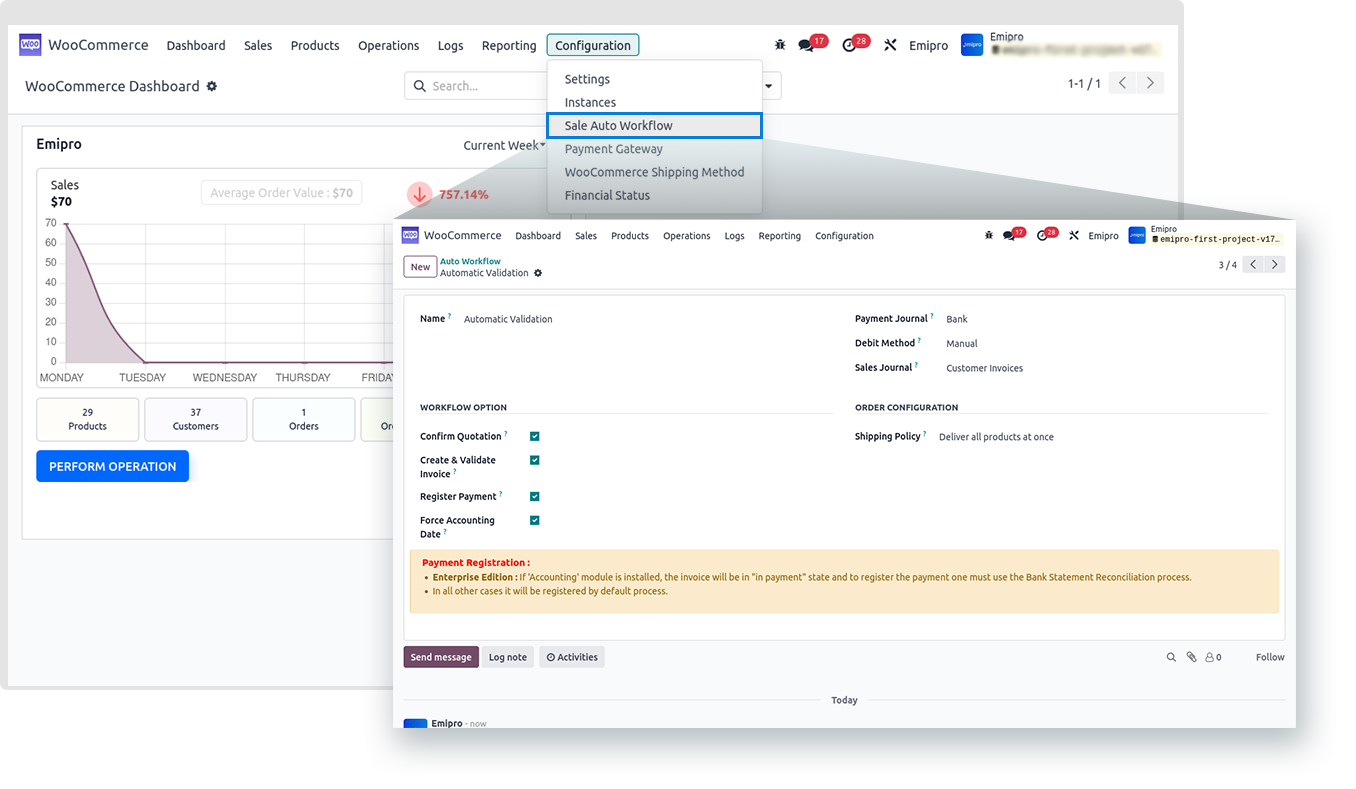
Sale Auto workflow is one of the most important configuration that we need to do in order to import the orders in desired status.
-
When orders are imported from WooCommerce stores to Odoo, you can define how you want Odoo to treat those orders. Default workflow will be created automatically by the system at the time of installation but the user has to configure it based on the requirements.
-
The connector will create a default workflow for the seller but you can configure it as per your requirement.
-
Sales auto workflow involves the various options such as:
-
Confirm Quotation: Once you activate this option the order arrives to confirm quotation status. Also you need to set an appropriate journal in the sales journal option.
-
Create & Validate Invoice: Once you activate this option it will create and validate the invoice automatically.
-
Register Payment: Once you activate this option it will automatically register payment of an invoice. Along with that you need to set an appropriate payment journal and Debit Method.
-
Force Accounting Date: Once you activate this option it will set the date of order in the accounting entry. If you deactivate this option then it will set the date on which when the invoice gets posted in the accounting entry.
-
Suppose you have a customer who has chosen Wire Transfer as a payment method for their order. In such a case you might prefer to manually validate invoice and register payment.
-
Whereas if a customer has chosen PayPal as a payment method, you may want to automatically validate their invoice and register the payment. For such different conditions, you can assign separate workflow settings.
-
You can create multiple Sales Auto Workflow and you set those workflows to the Payment Gateway under Financial Status option.